Know what's left before you spend it.
Pocket keeps your balance in the Mac menubar and tells you how long it will last. Your money stays on your Mac.
00 · See it
One balance, everywhere you look.
A number in your menu bar, a window for the details, and a plan for the months ahead.
01 · Features
Know when it runs out.
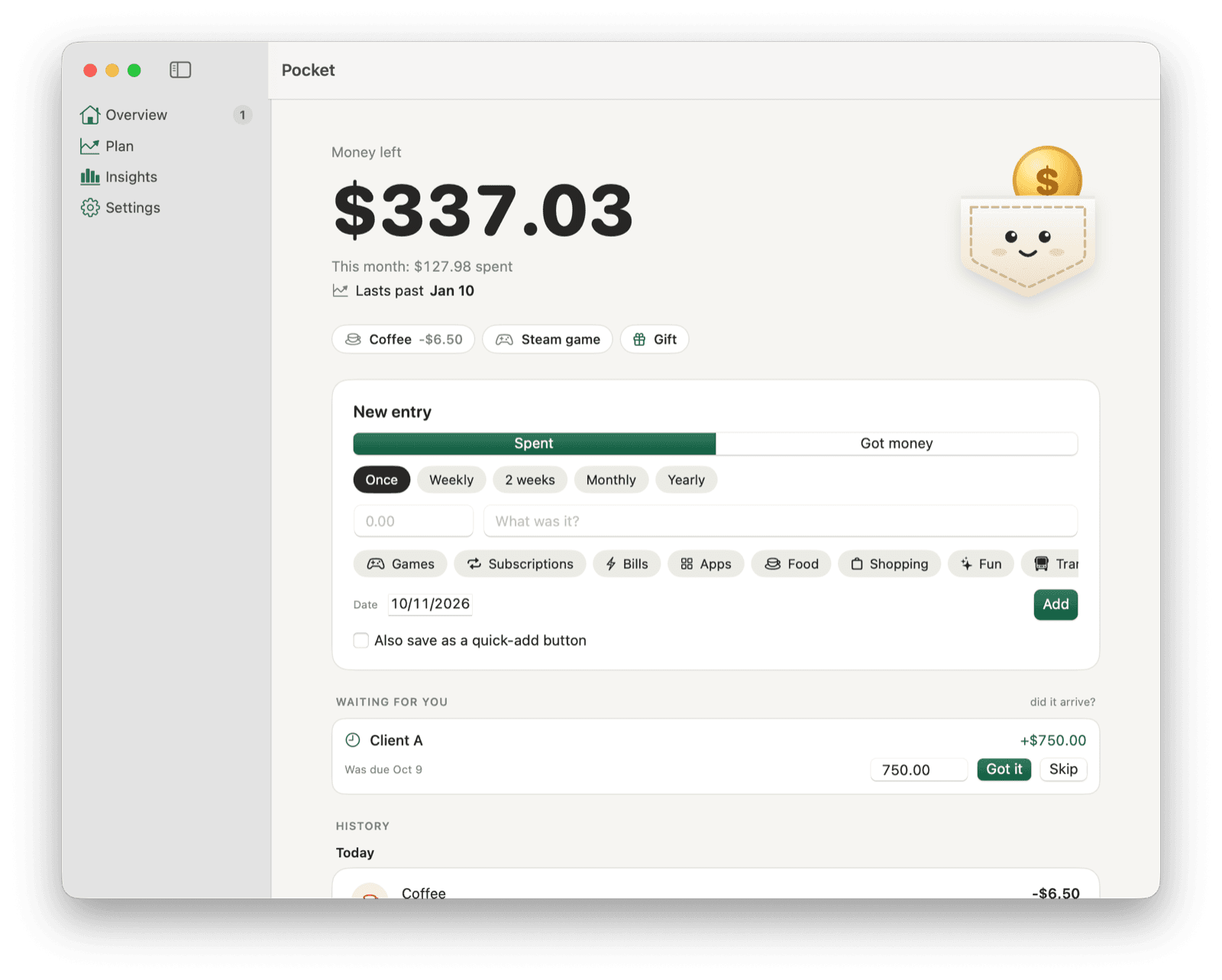
Add your bills, subscriptions and paychecks once. Pocket logs them on their day and draws where your balance is heading, a month or a year out.
- “Lasts past Jan 10”, or “Runs out on Dec 4”, at a glance
- Every payment coming up, with the balance after it
- Pause, skip or stop anything that repeats
Made for money that doesn't arrive on schedule.
Freelance pay, refunds, the friend who owes you: mark it as something you're waiting for. When it lands, click “Got it” and type what actually arrived, even if it came late or smaller.
- A reminder on the day it's due
- Quick-add buttons for the things you buy often, ⌘1 to ⌘9
- Categories and a monthly breakdown of where it went
02 · Price & privacy
Free. Every feature in it.
No account, and Pocket is yours.
On your Mac
How Pocket works out of the box. Nothing to sign up for.
- Everything in one file on your Mac
- Nothing is sent anywhere
- Seven daily backups
- Export, import or erase any time
With sync
Optional. Your balance on your phone too, from a server you run.
- The Pocket web app on your phone or any computer
- Pair a device with a 6-digit code
- Your Mac keeps a full copy and works offline
- A free Supabase project that only you can read
03 · Questions
Straight answers.
Is Pocket free?
Yes. Every feature, with no account and no trial. The source code is on GitHub.
Does Pocket connect to my bank?
No. You add what comes in and what goes out, and Pocket keeps the balance you've recorded. Repeating payments log themselves on their day, and quick-add buttons (⌘1 to ⌘9) add the things you buy often in one keystroke.
Where is my money data stored?
In one file on your Mac (~/Library/Application Support/Pocket/ledger.json), with seven daily backups. From Settings you can export it as JSON, import it again, or erase it.
Can I see my balance on my phone?
Yes, if you want to. Connect Pocket to a server you run (a free Supabase project), then pair your phone from Settings → Sync. Your phone uses the Pocket web app, and your Mac keeps a full copy that works offline. Read the self-hosting guide.
Which currencies does it support?
Any standard currency. Each ledger uses one. Changing it relabels your amounts; it doesn't convert them.
Which Macs does it run on?
macOS 14 Sonoma or later, on Apple Silicon and Intel. The app is signed and notarized by Apple.
How do I move Pocket to a new Mac?
Export your data from Settings on the old Mac, then import that file on the new one.
Is there a Windows or iPhone app?
Not a native one. With sync set up, the Pocket web app works in any browser, and you can add it to your home screen.
Ready to know what's left?
Free for macOS 14 or later, on Apple Silicon and Intel.