Skip to release notes

What’s new
in Pocket.

The releases, refinements, and little details
that make Pocket better to use.

v1.1.0Latest release

Your balance, on your phone too.

Optional sync joins Pocket. Keep using it entirely on your Mac, or connect your own server to take your balance with you.

Pocket 1.1

Your Mac.
Your phone.
Your server.

Sync is optional. You’re in control.
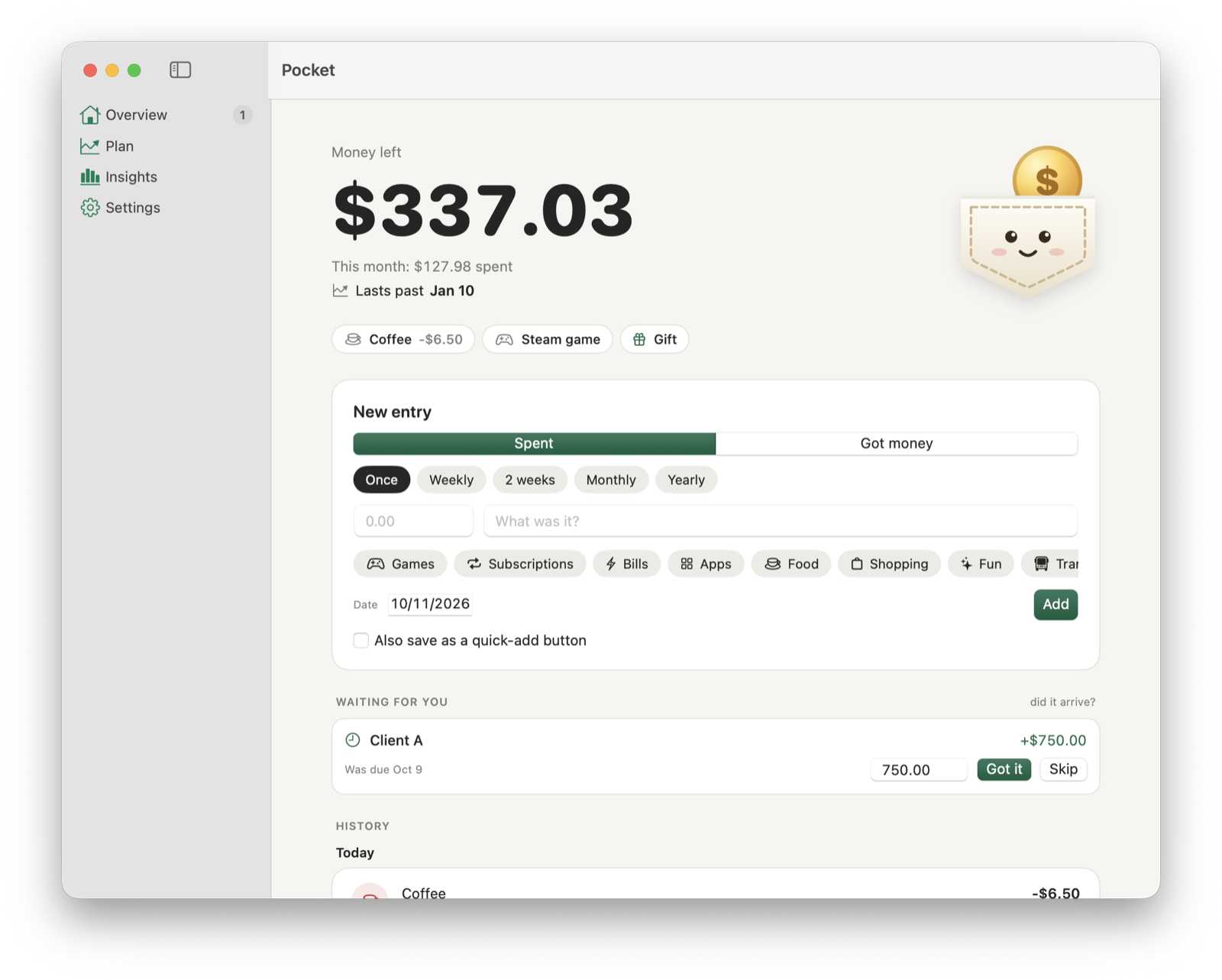
Pocket for Mac’s Overview window with balance, history and quick-add buttons
  • Connect your own server

    Use a free Supabase project. Connect it in Settings → Sync, then move the money already on your Mac over with Set Up This Server.

  • Pair your phone

    Choose Pair in Settings → Sync. The link opens the Pocket web app with your server and pairing code ready to go.

  • Keep going offline

    Your Mac keeps a full copy and sends changes in order when you’re back online. Uncertain requests wait for review, so a payment isn’t added twice.

A cleaner Pocket for Mac4 more changes
  • A bigger amount field comes first. Date, category and repeat options open in a separate sheet.
  • Categories have their own colors. Red now means below zero.
  • A simpler menu bar panel shows a one-line notice when payments are waiting for you.
  • History includes day totals, alongside a native sidebar and tidier Plan, Insights and Settings.
v1.0.0

Hello, Pocket.

The first release for Mac. A balance in your menu bar, a plan for what’s ahead, and your money stored on your own computer.

  • Know what’s left

    Your balance lives in the menu bar, with quick adds and recent entries one click away. Customize quick-add buttons and use ⌘1 through ⌘9.

  • See what’s ahead

    Schedule bills, subscriptions and paychecks. Plan forecasts the next 1, 3, 6 or 12 months, including when your balance runs out or comes back above zero.

  • Confirm money when it arrives

    Freelance pay and refunds can wait for confirmation. Got it records the actual amount and date, with a reminder on the day it’s due.

More in the first release5 more changes
  • Weekly, every two weeks, monthly and yearly repeating payments, with an optional end.
  • Categories and a monthly breakdown of spending in Insights.
  • One local data file, seven daily backups, and export, import and erase controls.
  • A pocket character that reacts to your money.
  • Free, signed and notarized for macOS 14 or later, on Apple Silicon and Intel.
The first chapter.On GitHub

You’re all caught up.

That’s every release of Pocket for Mac.

Something we can improve?

Tell us what happened, or what would help.

Share feedback

Almost there.

Pocket.dmg (3.2 MB) should be downloading. If it isn't, download it here.

  1. Step 1

    Open

    Open Pocket.dmg from your Downloads folder.

  2. Step 2

    Install

    Drag Pocket into your Applications folder.

  3. Step 3

    Launch

    Open Pocket and type what you have now. From then on, it's in your menu bar.